So which one is better?
Here’s the truth nobody wants to tell you: the answer isn’t which platform is “better.”
The real question is: which one matches how your team actually works?
I’ve watched Malaysian organisations tear themselves apart over this decision. IT wants Google because it’s cheaper. Finance wants Microsoft because “that’s what we’ve always used.”
The CEO read an article on the plane and now has opinions. Meanwhile, your team is stuck in the middle, just trying to get work done while everyone argues about enterprise licensing.
Let’s cut through the noise. You’re not choosing between good and evil. You’re choosing between two solid platforms that do things differently.
Here’s what actually matters when you’re making this decision for a Malaysian workplace—where approval hierarchies are real, IT budgets are tight, and your team is probably using WhatsApp for half their communication anyway.
The Microsoft to Google Workspace Bridge
If you’re comparing these platforms, here’s the honest translation:
| What You Need | Microsoft 365 | Google Workspace |
|---|---|---|
| Outlook | Gmail | |
| Documents | Word | Google Docs |
| Spreadsheets | Excel | Google Sheets |
| Presentations | PowerPoint | Google Slides |
| Cloud storage | OneDrive | Google Drive |
| Team chat | Teams | Google Chat |
| Video calls | Teams | Google Meet |
| Collaboration | SharePoint | Shared Drives |
Both do the job. The difference is how they do it—and whether that “how” fits your team’s reality.
Section 1: Real-Time Collaboration (Where Google Workspace Wins)
Here’s what I see happen in Malaysian offices every single day:
Three people editing the same tender document. One person has version_final.docx. Another has version_final_ACTUAL.docx. The third person is editing version_final_updated_jan15.docx. It’s 4:30pm. The submission deadline is 5pm. Everyone’s panicking in the WhatsApp group.
Sound familiar?
Google Workspace’s approach:
One document. One link. Everyone edits the same file at the same time. You see their cursor moving. You see their changes happening live. No more “save as” chaos. No more “who has the latest version?” messages.
Microsoft 365’s approach:
When you’re managing a tender with input from your Penang vendor, KL legal team, and JB operations—all while your boss is traveling—you need collaboration that just works. No version control drama. No “can you send me the latest file?” messages at 11pm.
Google Workspace makes this effortless. Microsoft 365 makes it possible, but you’ll fight your team’s habits to get there.
Why this matters in Malaysian workplaces:
When you’re managing a tender with input from your Penang vendor, KL legal team, and JB operations—all while your boss is traveling—you need collaboration that just works. No version control drama. No “can you send me the latest file?” messages at 11pm.
Google Workspace makes this effortless. Microsoft 365 makes it possible, but you’ll fight your team’s habits to get there.
The honest limitation:
If your team has decades of Excel expertise—macros, pivot tables, complex formulas—Google Sheets will frustrate them. Excel is still more powerful for advanced spreadsheet work. But for 80% of what most teams actually do? Google Sheets gets the job done with way less version control headache.
Section 2: Offline Access & Reliability (Where Microsoft 365 Has the Edge)
Let’s be honest about Malaysia’s internet reality.
You’re on the LRT. Your 4G cuts out in the tunnel. You need to review that report before your meeting in 20 minutes.
Or you’re traveling to a site visit in an area with spotty coverage. Or your office WiFi dies (again) and you’re stuck using mobile data.
Let’s be honest about Malaysia’s internet reality.
You’re on the LRT. Your 4G cuts out in the tunnel. You need to review that report before your meeting in 20 minutes.
Or you’re traveling to a site visit in an area with spotty coverage. Or your office WiFi dies (again) and you’re stuck using mobile data.
Microsoft 365’s strength:
Desktop apps work fully offline. You’ve got Word, Excel, PowerPoint installed on your laptop. No internet? No problem. Edit everything. Changes sync when you’re back online.
This is huge for people who travel frequently or work in areas with unreliable connectivity.
Google Workspace’s reality:
You can enable offline mode—but you have to set it up beforehand, and it’s not as seamless. Most people don’t even know it exists until they’re stuck without internet and wondering why they can’t access their files.
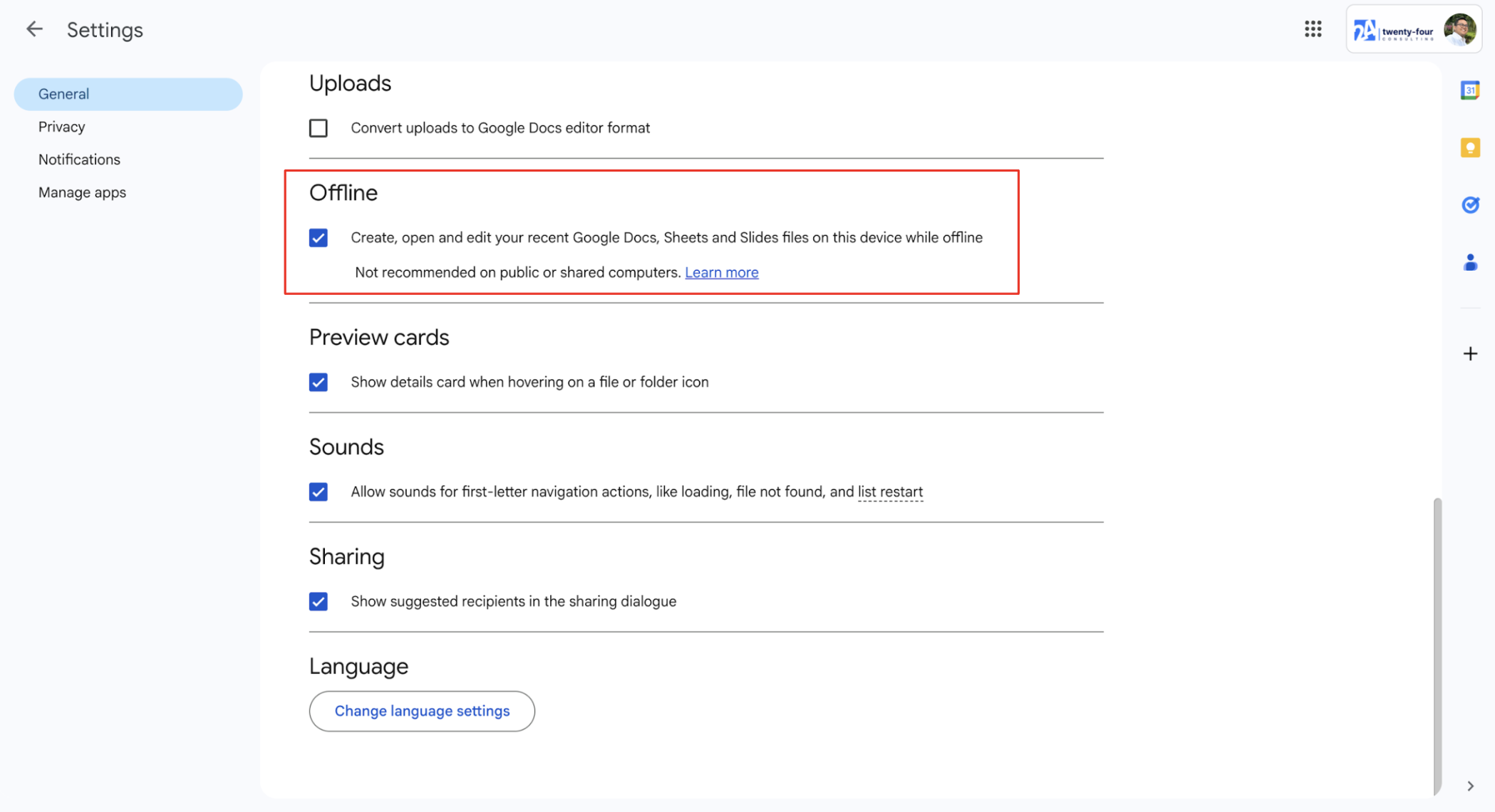
Can you make Google Workspace work offline? Yes. Is it as intuitive as Microsoft? No.
The workaround:
If you’re on Google Workspace and you travel often:
- Open Google Drive on your laptop
- Go to Settings (gear icon) > Offline
- Check “Create, open and edit your recent Google Docs, Sheets and Slides files on this device while offline”
- Before you travel, open the files you’ll need—this saves them for offline access
Takes 5 minutes to set up. Could save you from that “I can’t access the presentation 20 minutes before my pitch” panic.
Why this matters:
If your team is field-based—site engineers, sales reps visiting clients outstation, operations people traveling between facilities—Microsoft’s offline experience is genuinely better. If you’re mostly office-based with a stable internet, this matters less.
Section 3: Cost & Licensing (The Real Conversation Nobody Wants to Have)
Let’s talk about what this actually costs—because your finance team definitely is.
The Microsoft reality:
Most Malaysian organisations already have Microsoft licenses. You’re already paying for it. Switching to Google means:
- Paying for Google Workspace
- Still paying for Microsoft (because someone in finance refuses to give up Excel)
- Running two platforms simultaneously
- Doubling your IT support burden
I’ve seen this happen. It’s expensive and confusing.
The Google pitch:
If you’re starting fresh or can genuinely move everyone over, Google Workspace is often cheaper—especially when you factor in:
- No separate email archiving costs (Gmail keeps everything)
- Unlimited storage on some plans
- Simpler licensing (fewer “which version do I need?” questions)
The hidden costs both platforms have:
Training time. Change management. The productivity dip while everyone’s learning. The IT hours spent on migration. The “can you help me find this feature?” requests for six months.
Budget for this. Seriously. The license cost is just the start.
My honest take:
If you’re already on Microsoft and it’s working fine—the switching cost might not be worth it. If you’re growing fast, hiring remote workers, or starting fresh, Google’s collaboration model is worth considering. If your CFO is breathing down your neck about costs, run the numbers on total cost, not just the license fee.
Section 4: IT Management & Security (What Your IT Team Cares About)
Your IT team has opinions. Strong ones. Here’s why.
Google Workspace’s admin experience:
Simpler to manage. Everything’s in one admin console. User provisioning is straightforward. Security settings are clear (even if they’re sometimes limited).
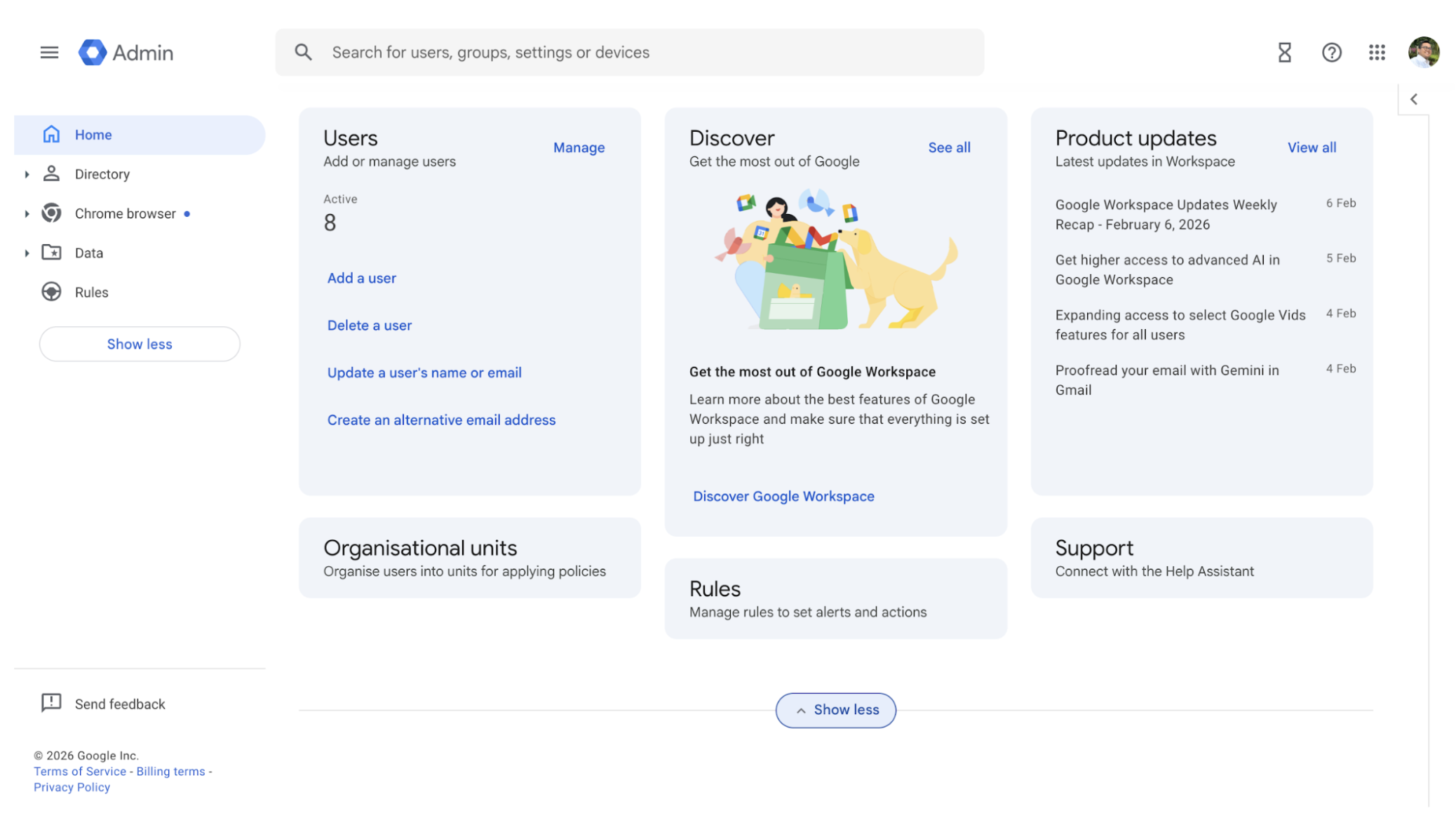
Great for smaller IT teams or organisations without dedicated Google admins.
Microsoft 365’s admin experience:
More control. More granular settings. More… everything. Which is either “powerful” or “overwhelming” depending on who you ask.
If you have experienced Microsoft admins, they can make 365 do exactly what you need. If you don’t, you’ll be calling expensive consultants to figure out why something doesn’t work.
Security & compliance for Malaysian organisations:
Both platforms meet most compliance requirements. Both offer 2FA, encryption, data loss prevention.
The real question: where’s your data stored?
- Google: Typically Singapore data centers (Malaysia coming soon)
- Microsoft: Typically Singapore and Malaysia options
For government contracts or highly regulated industries (finance, healthcare), this matters. Check your tender requirements. Some specifically require data to be stored in Malaysia—if that’s your situation, verify which platform can actually deliver that.
The approval culture reality:
Malaysian organisations love approval workflows. The document needs boss approval, then HOD approval, then finance approval, then maybe one more approval just to be safe.
Microsoft 365’s SharePoint can handle complex approval workflows out of the box. Google Workspace needs add-ons or workarounds (or you build it yourself with Google Apps Script if you have the technical chops).
If your organisation runs on multi-layer approvals for everything, Microsoft’s going to feel more natural.
Section 5: Mobile Experience (Because Everyone’s on Their Phone)
Reality check: your team is responding to emails from their phone while stuck in traffic on the Kajang Silk or Federal Highway. They’re reviewing documents while waiting for meetings. They’re approving requests from the mamak during lunch.
Both platforms have mobile apps. Here’s what actually matters.
Google Workspace mobile:
Gmail app is fantastic. Google Docs/Sheets/Slides on mobile are genuinely usable for quick edits. Not perfect, but functional.
Drive app makes finding files easy. Meet works well for quick video calls.
Microsoft 365 mobile:
Outlook mobile is excellent. Word/Excel/PowerPoint mobile apps are solid—especially if you’re already familiar with the desktop versions.
Teams mobile is… functional. Better than it used to be. Still not my favorite for quick calls.
The honest truth:
For mobile, they’re roughly equivalent. Most of your team will use email and light document viewing on mobile anyway. The differences matter more on the desktop.
Quick Start Checklist: How to Actually Decide
Don’t let this turn into a three-year committee decision. Here’s how to figure this out:
- Run a pilot with both platforms (2-3 weeks, small team)
- Pick 5-10 people who represent your typical users
- Give them real work to do, not sanitized test scenarios
- Ask them: “Which platform made your actual work easier?”
- Map your critical workflows
- Tender submissions with multiple reviewers?
- Approval processes across departments?
- Field teams needing offline access?
- Write down what you actually do daily, then test both platforms against that reality
- Calculate total cost
- License fees + migration + training + dual-platform period + IT support
- Be honest about the transition period (probably 6-12 months)
- Check your compliance requirements
- Government contracts with data residency rules?
- Industry-specific regulations?
- Get this wrong and you’ll be migrating again in a year
- Talk to your IT team AND your end users
- IT can tell you what’s manageable
- End users can tell you what’s actually usable
- Both perspectives matter
- Test your “edge cases”
- That one person with the 10-year-old Excel macro that runs the monthly report?
- The finance team’s complex spreadsheets?
- Make sure these actually work before you commit
Real-World Example
Here’s what this looks like in practice:
A mid-sized consulting firm in KL, 50 employees, mixed office and remote workers. They’ve been on Microsoft 365 for eight years. They’re considering Google Workspace because the CEO read that it’s “better for collaboration.”
Their reality:
Their finance team has Excel spreadsheets with macros for monthly reporting. Operations team manages tenders that need input from consultants, clients, and legal review—usually with tight deadlines. Half the team works from client sites with spotty WiFi. They have one IT person who manages everything.
What they tested:
They ran a one-month pilot. Put their most active project team on Google Workspace. Kept finance on Microsoft.
What they learned:
The project team loved Google Docs for collaborative proposal writing. No more version control nightmares. They could all edit the pitch deck simultaneously while on a call with the client.
But finance hit a wall. Their monthly report macro didn’t work in Google Sheets. They tried rebuilding it—would’ve taken 40 hours. Not worth it for a tool that already works.
Their IT person appreciated Google’s simpler admin console but worried about supporting two platforms long-term.
Their decision:
They stayed on Microsoft 365—but changed how they used it. Forced everyone to use the web version of Office for collaborative editing instead of downloading files. Set up SharePoint for tender document management. Stopped the version control chaos without switching platforms.
The lesson:
Sometimes the answer isn’t “switch platforms.” Sometimes it’s “use your current platform better.” Sometimes it’s “hybrid”—use both where they each make sense.
The point: test your actual workflows. Not theoretical use cases. Your actual daily work.
What to Try This Week
Pick one of these based on where you are:
If you’re considering switching:
- Identify your three most painful workflows right now (version control chaos? approval delays? finding files?)
- Test how both platforms handle these specific scenarios
- Make your decision based on real pain points, not feature checklists
If you’re already on Microsoft but curious:
- Sign up for a free Google Workspace trial
- Move one small project to Google Drive
- Try collaborative editing on a real document with your team
- See if the collaboration benefit is worth the switching cost
If you’re already on Google but missing Microsoft features:
- List the specific features you’re missing (probably Excel macros or offline access)
- Google “Google Workspace alternative to [feature]”—there might be a workaround you don’t know about
- Decide if the workaround is “good enough” or if you genuinely need Microsoft for this
Conclusion
So here’s what you know now: there is no “better” platform. There’s only “better for your specific team, workflows, and constraints.”
Google Workspace wins on real-time collaboration and simplicity. Microsoft 365 wins on offline access and advanced features. Both cost about the same. Both are secure enough for most Malaysian organisations. Both will frustrate your team in different ways during the transition.
The decision isn’t about which platform has more features. It’s about which platform’s strengths match your team’s actual pain points. And whether the switching cost—in time, money, and productivity dip—is worth solving those pain points.
Stop asking “which is better?” Start asking “which one makes our hardest workflows easier?”
Then run a pilot. Test your real work. Make a decision based on evidence, not vendor promises.
Your team will thank you. Or at least complain less.
Make the Platform Work for Your Team
Whichever platform you choose — Google Workspace or Microsoft 365 — the real difference isn’t the license.
It’s how your team uses it.
Most productivity issues don’t come from the software itself. They come from habits: emailing attachments, unclear approval flows, poor document control, or not knowing which features actually matter.
That’s where proper training makes the difference.
We organise hands-on Google Workspace and AI training for companies who want their teams to fully make use of their platforms — not just “have the license.”
Our sessions focus on real workflows: collaboration, approvals, reporting, automation, and practical use of AI tools to reduce repetitive work.
If you’d like your team to work with more clarity, confidence, and structure, we’re happy to help.
 Contact us at https://twenty-four.io/contact

By Fahim Zulkafli
Business Operations Manager @ Twenty-Four Consulting
By Fahim Zulkafli
Business Operations Manager @ Twenty-Four Consulting
Related Posts