
You Don’t Need Custom GPTs to Build AI Agents
Many people think they need Custom GPTs (MyGPTs) to create their own AI agents.
But what if you’re using the free version of ChatGPT and don’t have access to that feature?
Good news: you can still create something very similar by using Projects.
Projects allow you to organize conversations, set instructions, and attach knowledge sources. With the right setup, a project can act like a simple AI agent that helps you repeatedly with a specific task.
Let’s break down how this works.
First, What Is a Project in ChatGPT?
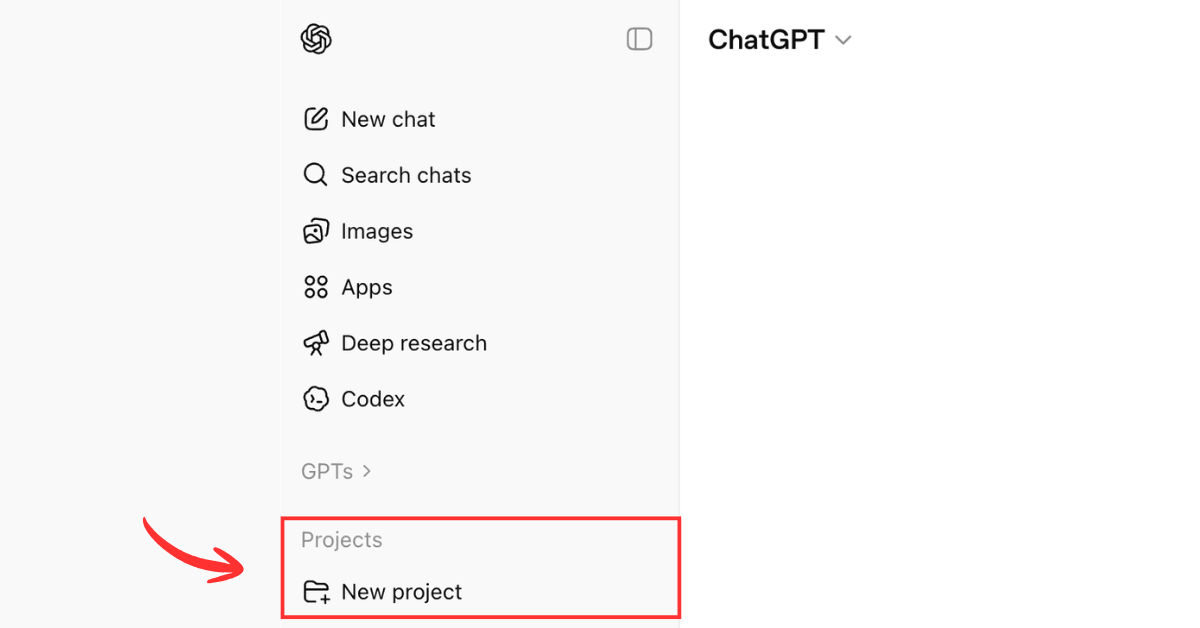
A Project is essentially a workspace inside ChatGPT.
Instead of having random chats everywhere, you can create a project dedicated to a specific purpose. Inside that project, you can:
- Set custom instructions
- Upload files or sources
- Keep all related chats in one place
When configured properly, the AI in that project will behave based on the instructions and knowledge you provide.
That’s why many people use projects as task-specific AI assistants.
How Projects Can Work Like AI Agents
An AI agent is basically an AI that is configured to do a specific job repeatedly.
Projects allow you to simulate this by doing three things:
1. Set Clear Instructions
Inside a project, you can define how the AI should behave.
For example, you could instruct it to:
- Write professional emails
- Generate course outlines
- Create training proposals
- Review documents
Once the instruction is set, every conversation inside that project will follow that guidance.
2. Add Knowledge or Sources
Projects also allow you to upload documents or reference files.
These could include:
- Proposal templates
- Course outlines
- Company profile
- Pricing structures
- Writing guidelines
The AI can then reference these files when generating answers.
This makes the responses more consistent and aligned with your workflow.
3. Use the Same Project for Repeated Tasks
Instead of explaining the same thing every time, you simply return to the same project.
Over time, the project becomes a specialized assistant for that task.
For example:
- A Proposal Project
- An Email Writing Project
- A Course Outline Project
Each project behaves slightly differently because of the instructions and files you provided.
Example: How I Use Projects as AI Agents
Here are a few ways I personally use them.
Email Writing Project
I created a project specifically for writing emails to clients.
The instructions tell the AI to:
- Write in a professional tone
- Keep the message clear and concise
- Follow my usual communication style
Now whenever I need to reply to a client, I open that project and draft the email there.
Course Outline Project
Another project is dedicated to creating training course outlines.
I uploaded several existing outlines and provided instructions such as:
- Follow our standard training format
- Include modules, learning objectives, and activities
- Keep it suitable for corporate training
Whenever I need a new outline, I simply start a chat in that project.
Proposal Writing Project
This project helps generate training proposals.
It already knows:
- My usual proposal structure
- How I write the executive summary
- What sections should be included
This saves a lot of time when preparing documents for clients.
Projects vs Custom GPTs
Projects are not exactly the same as Custom GPTs, but they can achieve a similar outcome.
Custom GPTs
- More structured configuration
- Built specifically as reusable AI tools
Projects
- Simpler setup
- More flexible
- Works well for organizing workflows
Think of Projects as a lighter version of AI agents.
Final Thoughts
If you’re using the free version of ChatGPT, you might think you’re limited because you don’t have access to Custom GPTs.
But Projects can still help you create task-specific AI assistants.
By setting clear instructions, adding reference materials, and organizing your workflows into projects, you can turn ChatGPT into a collection of mini AI agents that support your daily work.
You just need to configure them properly.
And once you do, you’ll start to see how powerful this setup can be.
Want to learn how to use AI tools more effectively in your daily work?
At Twenty-Four Consulting, we’ve upskilled thousands of professionals and teams across Malaysia in Canva, Google Workspace, and Generative AI. Our training sessions are practical, focused on real workflows, and designed for teams who want results.
 Get in touch at https://twenty-four.io/contact

By Adam Zakaria
Account Manager @ Twenty-Four Consulting
By Adam Zakaria
Account Manager @ Twenty-Four Consulting
Related Posts